Read our useful article about Dynamics NAV licensing
Perpetual model
You license the software with permanent usage rights. So, you can use the licensed version of the software for as long as you choose. Perpetual Licensing might be for you if you prefer an upfront investment or if you want to manage the solution internally, and will run the software on your premises (or, subject to license mobility rights, have it hosted by a third-party Infrastructure as a Service [IaaS] provider acting as your agent).
Perpetual Model offers Concurrent Client Access Licenses (CALs), based on the number of users accessing the solution simultaneously. Microsoft Dynamics NAV 2017 contains two concurrency “counters”— one for Full Users and another one for Limited Users.
With Perpetual Model you are obliged to pay BREP (Business Ready Enhancement Plan) for the first year after activating the license.
Subscription model
You license non-perpetual rights to use the software, meaning you can use the software only during the term of the agreement secured by periodic payments. This model lowers your initial licensing costs and provides you with the flexibility to increase or decrease subscription license counts from one subscription term to the next (usually from month to month). You can use Subscription Licensing when you want to have the ERP solution hosted and managed as Software as a Service (SaaS) by your partner or any third party.
Subscription Model offers User Subscription Access Licenses (SALs) which grant individual users the right to access the application irrespective of the number of users simultaneously accessing the application.
With Microsoft Dynamics NAV 2017 (Perpetual Model), you must license:
The solution functionality
Access to the solution functionality by your users
Starter Pack is the minimum you will need to make the system up and running. It includes 3 FULL Users. Extended Pack will give your FULL Users access to advanced functionality of Microsoft Dynamics NAV.
With Subscription Model you license functionality AND users at the same time:
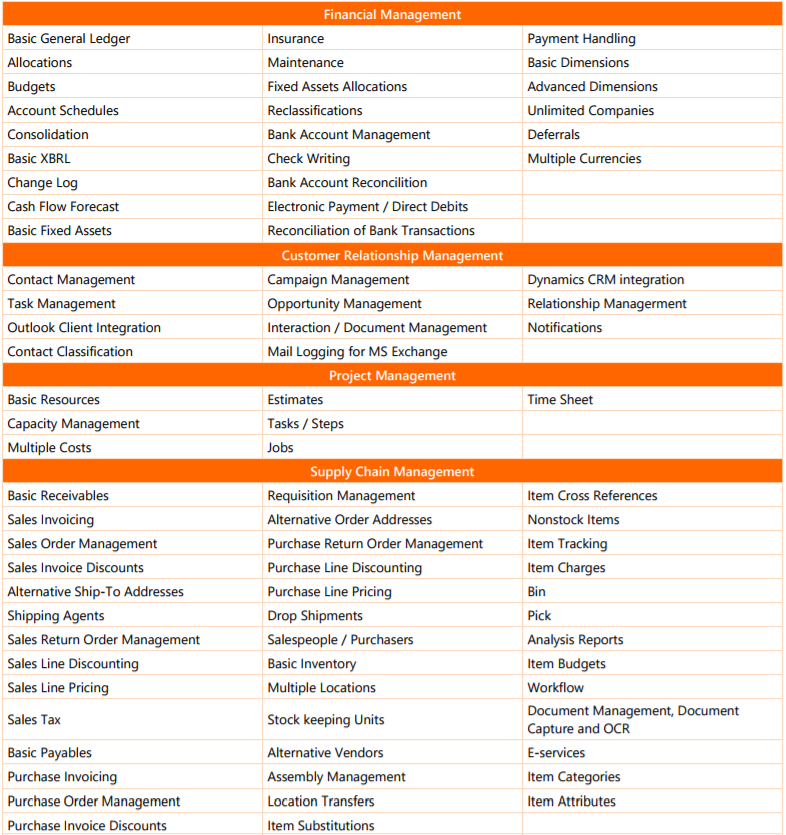
In short, Starter Pack is for the companies which need core financials and trade functionality:
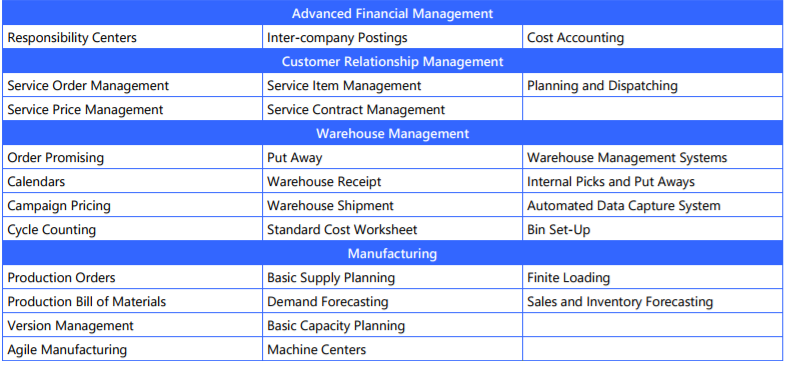
With Extended Pack you will have access to additional functionality:
Here are the details:
Appendix B: Microsoft Dynamics NAV 2017 Functionality Map
Starter Pack
Appendix C: Microsoft Dynamics NAV 2017 Fuctionality Map
Extended Pack
With FULL User license there is not much space for interpretation, as it is defined as: “Unrestricted direct or indirect access to all of the functionality in the licensed server software including setting-up, administering, and managing all parameters or functional processes across the ERP Solution.” In practice, it means full “Read” access and full “Write” access.”
For LIMITED User things get a little bit more complicated. It grants unrestricted “Read” access and “Write access” limited to 3 data tables. There are two caveats though:
In most practical terms let’s define what actions the LIMITED User can perform:
Standard Dynamics NAV is built upon the following objects:
There are hundreds or thousands such objects in the standard functionality and in order to enhance the system and introduce your modifications, you will need available objects which can be purchased in packages as ‘Additional Objects License’.
Moreover, Dynamics NAV Partners have free access to certain tools that enable them to introduce changes to the system. These tools are licenses separately for customers who do in-house development:
Perpetual and Subscription licenses allow for different implementation models that are listed in the table below.
The Starter Pack includes the rights for an unlimited number of external users to access the ERP solution without the need for individual Access Licenses as long as following two restrictions are met:
External users cannot use any clients provided by the Microsoft Dynamics NAV Application Programming Interface (API), such as the Microsoft Dynamics NAV 2017 Windows client, the Microsoft Dynamics NAV 2017 Web client, the Microsoft Dynamics NAV for Windows, the Microsoft Dynamics NAV for iPad or iPhone app, or the Microsoft Dynamics NAV for Android Tablet or Phone app. Therefore, the most popular way of accessing the application is through a dedicated (Web) Portal.
External user licenses cannot be used by you to provide business process outsourcing services to your customers.
Your system administrator designates external users (such as customers) in the user table by assigning such users an External User designation.
Multiplexing is a practice of accessing the application through a “Pooling Resource” in order to minimize impact on the database. Multiplexing does not reduce the number of Microsoft licenses required. Users are required to have the appropriate licenses, regardless of their direct or indirect connection to the product.
You need only one Starter Pack license per ERP Solution deployment—even if your installation is deployed over multiple servers as long as you own those servers and that they are in the same physical location.
Through the License Mobility rights included with your enhancement plan (BREP), you may reassign your ERP solution licenses to:
It is worth mentioning here that SQL Server Runtime Use licenses, offered in Order Central, do not qualify for License Mobility rights. So, if you are deploying your ERP solution in an IaaS environment, you will be required to license SQL through other licensing programs.
BREP (Business Ready Enhancement Plan) is a software assurance plan for Microsoft Dynamics NAV which is calculated as 16% of the license list price and is mandatory during the first year of owning the licenses. From year two you can decide if you want to remain on BREP and enjoy the benefits listed in the subsequent point.
While on BREP you can make new license purchases. Each purchase will need to include the BREP payment calculated until your next anniversary (the date until which your BREP is active). It means that new purchases require you to pay BREP only for the fraction of the year. Example: if you purchase a license 3 months before your anniversary, you won’t pay 16% BREP but only 4% (3/12 x 16%).
When you have decided not to pay BREP, you can still re-enroll by paying a ‘penalty’ 19% for the period when your BREP wasn’t active (plus 16% for one year forward). This is allowed for a maximum of 3 years after you unsubscribed from BREP (unless Microsoft will prolong this period).
Enables customers to purchase additional licenses (both for users and system objects) – when not on BREP customers can’t make new license purchases and at some point will be stuck while trying to expand the system.
Possibility to make a system upgrade with no additional cost – the current license investment will be calculated towards reducing the cost of purchasing the licenses for the newest version of the system. It usually means ability to upgrade the license 1:1.
Access to Customer Source – a portal for customers where the following materials can be found:
Most popular infringements include:
Since the release of Microsoft Dynamics NAV 2013 R2 CU10, license keys are version-specific. For example, a Microsoft Dynamics NAV 2017 license key is required to activate Microsoft Dynamics NAV 2017 software and a Microsoft Dynamics NAV 2017 license key will not activate any other versions of the software.
Would you like to learn more? Let's get in touch.
Sending...