
Below is a list of possibilities offered by the integration of Business Central with Microsoft Outlook and presents how sending documents from Business Central to an e-mail box looks like (using the integration of an e-mail account with Business Central).
List of benefits of integrating Business Central with Microsoft Outlook:
Sending documents from Business Central via email messages
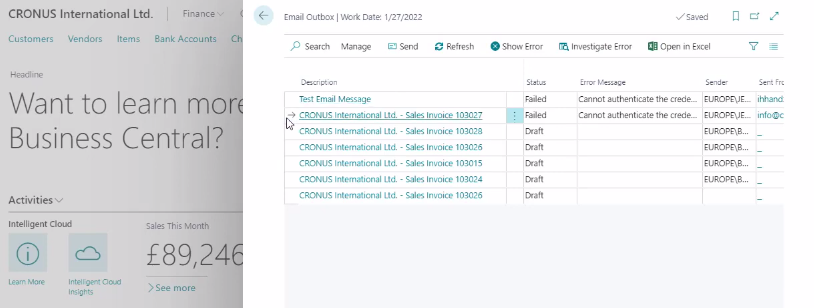
By connecting an email account with Business Central, you can send documents directly from Business Central without having to open an email program separately (eg Microsoft Outlook). There is an e-mail outbox in Business Central. With this solution, we can send documents (e.g. sales or purchase invoices) directly from the application to any e-mail. Moreover, it is possible to plan the dispatch of individual documents by preparing draft versions of individual messages.
An example of a Draft message in the Inbox accessible from Business Central is shown in the screenshot below.
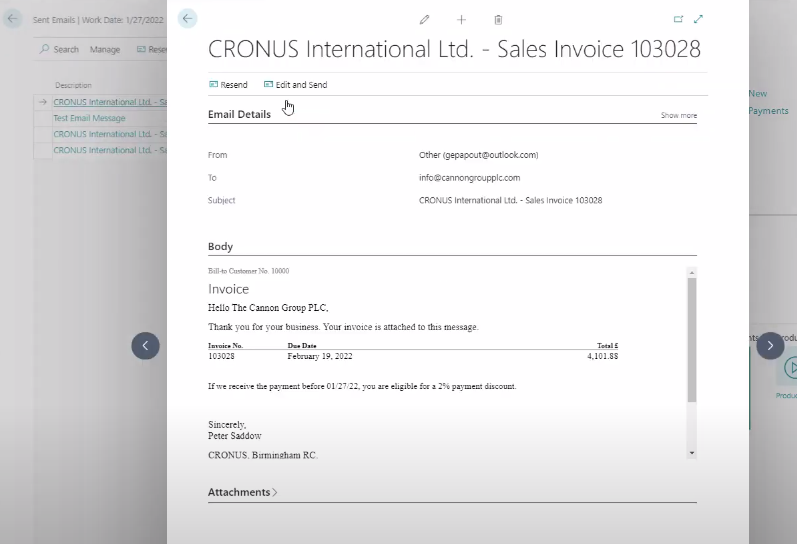
An example of a sent e-mail with an attachment in the form of an invoice is shown in the screenshot below.
Would you like to learn more? Let's get in touch.
Sending...