
If your company runs Dynamics CRM or Dynamics 365 Customer Engagement on its own servers, there is no need to panic. But there is a reason to start planning. Dynamics 365 Customer Engagement 9.1 remains supported for several more years. At the same time, some of the services around it are changing much sooner. The most immediate issue is email.
Microsoft is retiring Exchange Web Services (EWS) in Exchange Online. For companies running Dynamics 365 on-premises with Exchange Online, this can affect how emails, appointments and other information synchronise between the two systems. Microsoft states that the existing on-premises integration with Exchange Online will end on 1 April 2027.
So the important question is not simply: "How long is our CRM supported?"
It is: "How long will the CRM setup we rely on today continue to work as expected?"
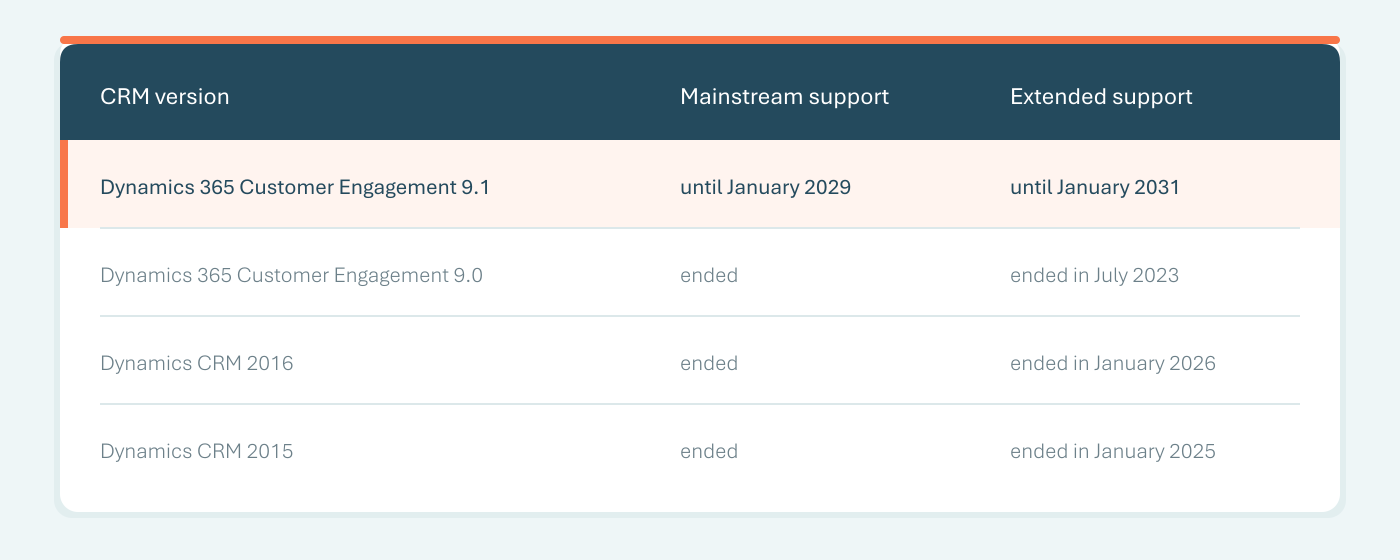
If you are running Dynamics 365 Customer Engagement 9.1, you still have time to decide what comes next. The system does not suddenly stop working when Microsoft support ends. But the level of support changes over time, and eventually Microsoft security fixes and regular product support end as well. Microsoft also recommends keeping version 9.1 on the latest published updates.
For companies on older versions, the first step should therefore be very simple: check exactly which version you are running. If you do not know, your CRM administrator or IT team should be able to confirm it.
This is the more urgent deadline. Dynamics 365 Customer Engagement on-premises can use EWS to communicate with Exchange Online. Microsoft is removing EWS from Exchange Online in April 2027. Its current Dynamics documentation recommends migrating to Dynamics 365 online, or taking the required steps to maintain EWS access until the retirement date.
That matters because the integration can be responsible for things users take for granted every day:
This does not mean Outlook or your entire Dynamics CRM will stop working in April 2027. It means the EWS-based connection between on-premises Dynamics 365 and Exchange Online needs to be addressed. And simply upgrading CRM to version 9.1 does not solve that problem.
If you are unsure whether this affects you, ask IT two questions:
If the answer to both is yes, this belongs on your roadmap now.
This is an important distinction because an upgrade and a move to the cloud solve different problems. Updating your on-premises environment to Dynamics 365 Customer Engagement 9.1 keeps you on an on-premises architecture. It does not automatically give you the standard cloud capabilities available with Dynamics 365 online.
Microsoft positions capabilities such as Copilot, Power Automate and Power BI among the benefits available when moving Dynamics workloads to the cloud. That does not mean AI is impossible with an on-premises system. Custom solutions and integrations can be built. But they need to be designed, secured and maintained as integrations rather than simply enabled as standard Dynamics 365 cloud functionality.
So if AI is part of your future CRM plans, the question should not only be: "Can we upgrade?" It should also be: "Does staying on-premises still fit where we want CRM to go?"
There is another integration question worth checking. If your users rely on older Outlook add-ins to work with Dynamics 365, confirm exactly which add-in they use before moving them to the new Outlook. The older Dynamics 365 for Outlook and the newer Dynamics 365 App for Outlook are not the same thing, and compatibility should be checked as part of your broader CRM and email review. This is especially important if Outlook is an essential part of how salespeople record customer communication in CRM.
There is no single answer for every company. For some organisations, staying on-premises for the next few years may still make sense because of internal policies, infrastructure requirements or complex integrations. In that case, upgrading to 9.1 and reviewing the integrations around it may be the practical next step. For others, the changing email integration is a good trigger to look at the bigger picture and assess a move to Dynamics 365 online.
Microsoft provides a migration path from Dynamics CRM on-premises to Dynamics 365 and Dataverse. Its current migration services support Dynamics CRM version 9.0 and later. But moving CRM to the cloud is not simply a technical copy-and-paste exercise.
Before migration, we typically look at:
The result should not simply be "the same CRM, but in the cloud". It should be a CRM environment that still supports the way your business actually works.
You do not need to decide today that your CRM must move to the cloud. You do need to understand your current situation.
Start with four questions:
From there, you can make a much more practical decision: upgrade the existing environment, prepare for cloud migration, or establish a phased roadmap covering both. The April 2027 EWS retirement makes the email integration the most immediate issue. It is also a useful opportunity to decide what you want your CRM environment to look like over the next few years.
At DIGMATIX, we can assess your current Dynamics environment, including the version, customisations, reports, Exchange connection and integrations with other systems. From there, we can help determine what needs attention now and what can wait. If staying on-premises still makes sense, we can help plan the upgrade and integration changes. If moving to Dynamics 365 online is the better direction, we can assess migration readiness and help prepare the move. The goal is not to move to the cloud simply because the cloud exists. It is to make sure your CRM continues to support the people and processes that depend on it. Talk to us to know more.
Will our CRM stop working when Microsoft support ends?
No. The end of support does not automatically switch off your CRM. However, Microsoft support and security updates change or end, while individual integrations may have their own earlier deadlines.
Will upgrading to version 9.1 solve the Exchange Online email issue?
No. If your Exchange Online integration relies on EWS, upgrading CRM alone does not remove the EWS dependency. Microsoft is retiring EWS in Exchange Online in April 2027.
Will Dynamics 365 9.1 give us Copilot?
No. Upgrading an on-premises installation does not turn it into Dynamics 365 online or automatically provide its cloud capabilities.
Do we have to upgrade to 9.1 before moving to the cloud?
Not necessarily. Microsoft's current on-premises-to-online migration services support Dynamics CRM version 9.0 and later.
We don't know which Dynamics version we have. Where do we start?
Ask your CRM administrator or IT team to confirm:
Would you like to learn more? Let's get in touch.
Sending...