
Implementing a Customer Relationship Management (CRM) system is a significant undertaking that can transform how your organization manages customer interactions, sales processes, and business intelligence. However, the journey from decision to full deployment requires careful planning, strategic execution, and stakeholder alignment. This guide walks you through the complete CRM implementation process, focusing on Dynamics 365 Sales as your platform.
Why CRM Implementations Fail-And How to Avoid It
The statistics are sobering: research from Gartner indicates that 30-70% of CRM implementations fail to meet their original objectives. Common failure points include inadequate change management, poor data quality, insufficient user adoption, and misaligned business processes.
Understanding these pitfalls is your first line of defense. Success begins with realistic expectations, executive sponsorship, and a methodical approach that accounts for both technical and organizational dimensions of change.
Pre-Implementation Checklist: Getting Ready for Success
Before your implementation project begins, ensure you have these critical elements in place:
Executive Sponsorship
Secure visible commitment from C-level leadership. CRM implementations that lack executive backing suffer from reduced resource allocation and lower stakeholder buy-in. Your sponsor should champion the project, remove organizational obstacles, and reinforce the importance of adoption across the company.
Clear Business Objectives
Define specific, measurable goals. Are you aiming to reduce sales cycle length by 20%? Improve customer retention by 15%? Increase forecast accuracy? Your objectives should align with corporate strategy and serve as the north star throughout implementation.
Data Readiness Assessment
Audit your current data quality. Legacy systems often contain duplicate records, incomplete fields, and inconsistent formatting. Plan for data cleansing before migration-it's far easier to correct records now than to implement a system and discover data problems during go-live.
Change Management Plan
Designate a change management lead and create a formal communication strategy. Plan for training, documentation, and support during the transition. Resistance to change is normal; a well-structured change management approach transforms it into adoption.
Stakeholder Identification
Map key stakeholders across sales, operations, IT, and finance. Involve them early and often. Different groups have different needs-sales teams need easy data entry and reporting; finance needs audit trails and forecasting accuracy; IT needs system security and integration capability.
The 6-Phase Dynamics 365 CRM Implementation Methodology
A structured implementation approach reduces risk and increases the likelihood of on-time, on-budget delivery. Here's the proven framework we recommend:
Phase 1: Discovery (1-3 weeks)
Understand your current environment, business processes, and requirements. This phase involves stakeholder interviews, process mapping, and documentation of existing workflows. Your discovery output becomes the blueprint for all subsequent phases.
Deliverables:
- Current-state process documentation
- Requirements specification document
- System architecture recommendations
- Preliminary project timeline and budget estimate
Phase 2: Design (2-4 weeks)
Translate requirements into a system design. Define your organizational structure in Dynamics 365, design the sales pipeline, configure record types, and plan customization requirements. This is where technical decisions get made: which processes will be automated, what custom fields are necessary, which integrations are critical.
Key Design Decisions:
- Sales team hierarchy and territory assignments
- Custom entities and fields
- Integration points with ERP, email, and other systems
- Security roles and data access rules
- Reporting and analytics requirements
Phase 3: Build (4-8 weeks)
Developers configure and customize Dynamics 365 Sales to match your design specifications. Standard configuration (using native features) is preferred wherever possible, with custom development reserved for genuinely unique requirements. This phase includes creating custom workflows, developing plugins if needed, and building reports and dashboards.
Phase 4: Test (2-4 weeks)
Rigorous testing occurs in a staging environment that mirrors production. User acceptance testing (UAT) involves key stakeholders validating that the system works as intended. Performance testing ensures the system can handle your transaction volume. Data migration is tested repeatedly to validate data quality and completeness.
Testing Types:
- System integration testing
- User acceptance testing (UAT)
- Data migration validation
- Performance and load testing
- Security and compliance testing
Phase 5: Deploy (1 week)
Cut over to the production environment. This typically occurs over a weekend or during a scheduled maintenance window. Your data is migrated, users are activated, and the system goes live. A deployment checklist and rollback plan mitigate risks.
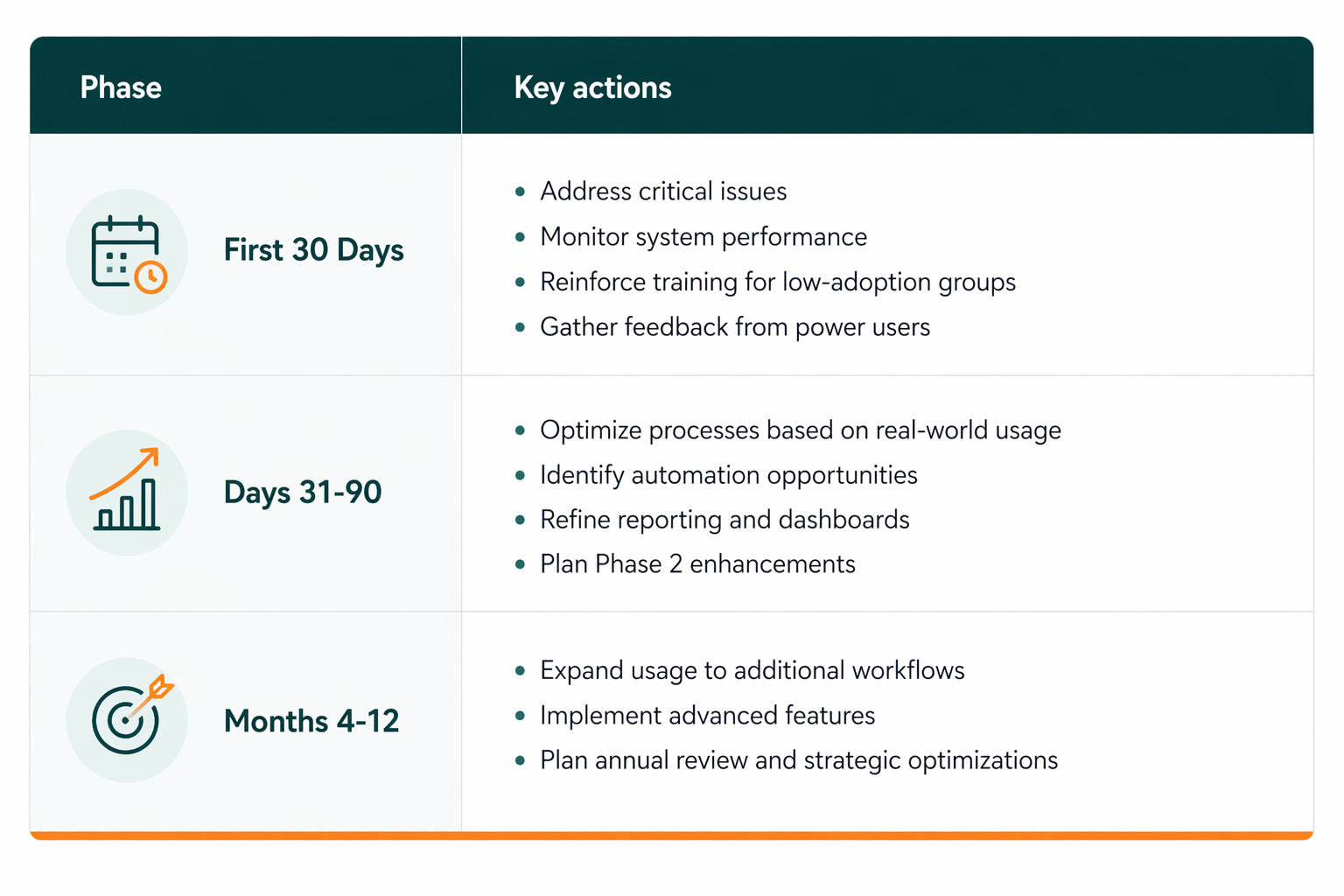
Phase 6: Optimize (Ongoing, first 3 months post-launch)
Monitor system performance, user adoption, and business metrics. Address issues that surface, optimize configurations based on real-world usage, and refine processes. Many organizations underestimate this phase-the reality is that optimization is continuous, not something you "complete."
Implementation Timeline Expectations
Timeline varies based on scope and organizational complexity. Here's what to expect:
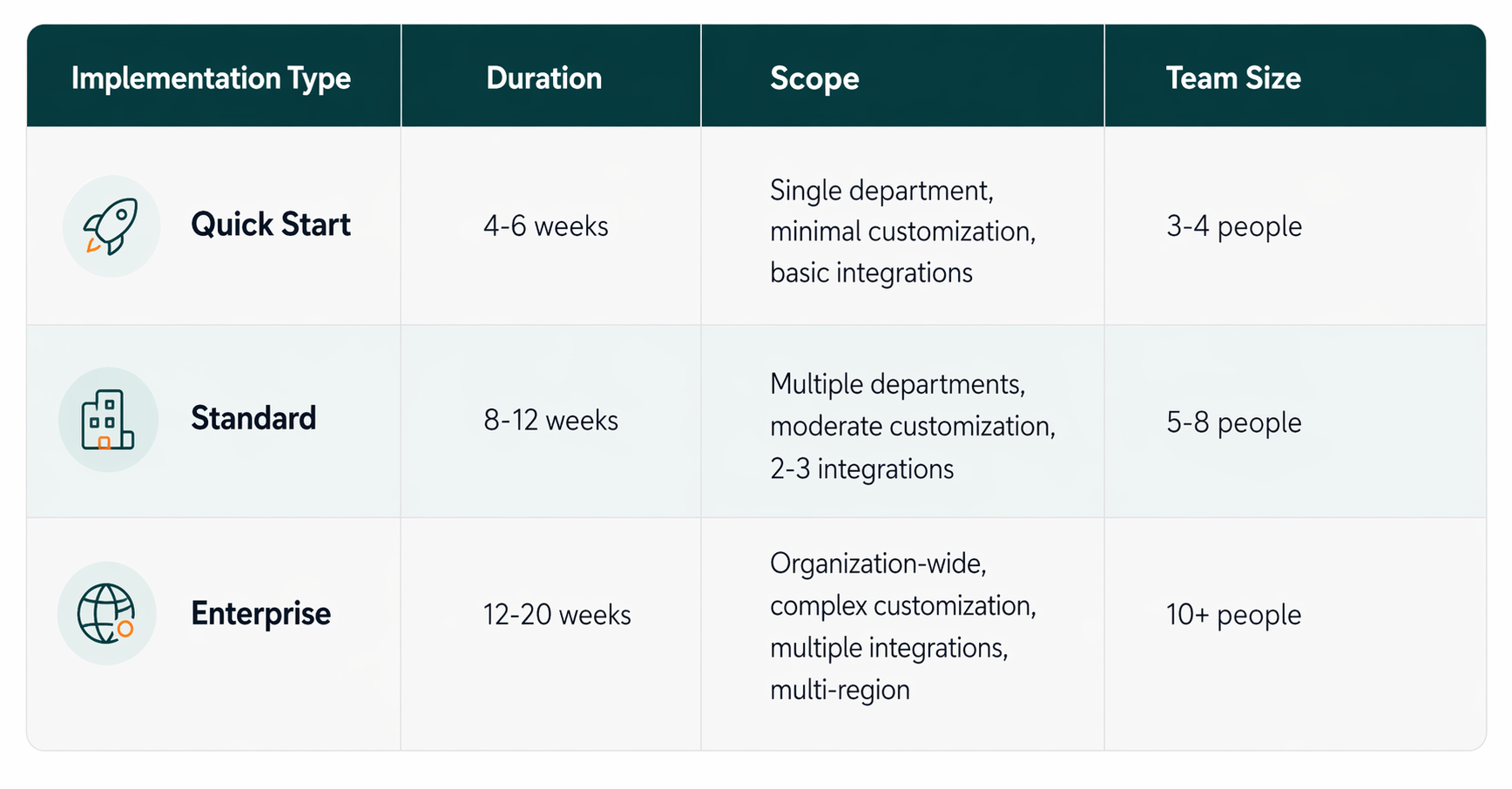
These timelines assume dedicated resources and consistent executive support. Delays often stem from scope creep, resource unavailability, or extended UAT cycles.
Budget Planning: Understanding Implementation Costs
CRM implementation costs vary significantly based on deployment scope and organizational complexity. Here's a realistic breakdown using EUR pricing:
Small Business (Quick Start):
- Software licensing: €5,000-€15,000/year
- Implementation services: €15,000-€30,000
- Training and change management: €3,000-€8,000
- Total first-year cost: €23,000-€53,000
Mid-Market (Standard):
- Software licensing: €20,000-€50,000/year
- Implementation services: €40,000-€100,000
- Training, data migration, integration: €15,000-€40,000
- Total first-year cost: €75,000-€190,000
Enterprise (Multi-department):
- Software licensing: €50,000-€150,000/year
- Implementation services: €100,000-€300,000+
- Training, consulting, integration, customization: €40,000-€150,000
- Total first-year cost: €190,000-€600,000+
Additional costs to budget for: ongoing support and maintenance (typically 15-20% of licensing annually), training for new hires, custom development, and integrations with third-party systems.
Data Migration: Your Foundation for Success
Data quality directly impacts CRM success. Poor data leads to poor insights and eroded user confidence. Here's a proven data migration approach:
Step 1: Data Audit
- Identify all data sources (legacy CRM, ERP, spreadsheets)
- Assess data quality: completeness, accuracy, duplication
- Document data mapping rules
Step 2: Data Cleansing
- Remove duplicate records
- Standardize field formatting (phone numbers, addresses, company names)
- Fill critical gaps
- Document cleansing rules and decisions
Step 3: Migration Testing
- Perform test migrations in a non-production environment
- Validate record counts and data integrity
- Identify and fix mapping errors
- Run test migrations 2-3 times before cutover
Step 4: Final Migration
- Execute migration in a controlled maintenance window
- Verify data completeness and accuracy
- Prepare rollback plan in case issues arise
As Mareks Polis, CRM Practice Lead at DIGMATIX, explains: "Data migration is where many implementations stumble. Organizations often underestimate the effort required to cleanse legacy data. Investing time in this phase prevents months of user frustration with bad data after go-live."
User Adoption: The Critical Success Factor
Technology alone doesn't drive CRM value-users do. Organizations that achieve strong adoption see 3-5x higher ROI than those that don't.
Adoption Drivers:
- Executive Sponsorship - Visible commitment from leadership signals importance
- Clear Communication - Regular updates about why the change is happening and how it benefits users
- Comprehensive Training - Role-based training that shows sales reps exactly how Dynamics 365 makes their job easier
- Peer Champions - Identify respected team members early and make them system advocates
- Quick Wins - Celebrate early successes and demonstrate tangible value quickly
- Ongoing Support - Provide accessible help desk support and quick resolution of user issues
Mareks Polis advises: "User adoption failures are rarely about technology-they're about change management. Sales teams resist CRM when they perceive it as additional administrative burden rather than a tool that helps them close deals. Your implementation team must consistently connect system features to sales rep benefits."
Integration Planning: Connecting Your Ecosystem
Most organizations use multiple systems. Plan integrations carefully:
Common Integration Requirements:
- ERP Systems - Order-to-cash, inventory visibility, pricing updates
- Email and Calendar - Dynamics 365 integration with Outlook
- Customer Service - Syncing between Sales and Customer Service modules
- Marketing Automation - Lead scoring, campaign integration
- Business Intelligence - Power BI dashboards and reporting
Integration complexity adds 2-4 weeks and €10,000-€50,000 to implementation timelines and budgets, depending on the systems involved.
Post-Go-Live Optimization
Optimization is not a phase that ends-it's a continuous process. Plan for:
Measuring CRM ROI
Define success metrics before implementation. Common KPIs include:
- Sales Productivity: Reduction in time spent on administrative tasks
- Forecast Accuracy: Improvement in quarter-over-quarter forecast accuracy
- Deal Velocity: Reduction in average sales cycle length
- Customer Retention: Improvement in customer retention rates
- Revenue Impact: Increased deal size or close rates
- Adoption Rate: Percentage of target users actively using the system
Track these metrics for 6-12 months post-launch. Organizations that actively measure ROI typically realize benefits 3-6 months into the deployment.
Frequently Asked Questions
Q: How long does a typical Dynamics 365 Sales implementation take?
A: Most implementations take 8-12 weeks for mid-market organizations. Quick Start deployments can go live in 4-6 weeks, while enterprise-wide implementations may take 4-6 months or longer. The timeline depends on your current processes, data complexity, required integrations, and organizational readiness.
Q: What is the most common reason CRM implementations fail?
A: Inadequate change management is the leading cause of implementation failure. Users resist the system because they don't understand why it's beneficial or how to use it effectively. Organizations that invest heavily in communication, training, and change leadership achieve significantly higher success rates.
Q: Can we implement Dynamics 365 without engaging an implementation partner?
A: Small organizations with strong internal IT expertise can undertake Quick Start implementations independently. However, most organizations benefit from partner expertise in design, best practices, data migration, and integration. Partners reduce risk, accelerate timelines, and help organizations avoid costly mistakes.
Q: What should we do if our current data quality is poor?
A: Poor data quality should be addressed before migration. Plan 2-4 weeks for data cleansing and validation. This upfront investment prevents months of user frustration with duplicate records, incomplete information, and low data trust post-launch.
Q: How do we improve user adoption after go-live?
A: Sustained adoption requires ongoing communication, accessible training resources, quick resolution of user issues, and regular demonstration of system value. Designate adoption champions in each department, monitor usage metrics, and address adoption challenges quickly.
References
Gartner CRM Implementation Success Factors - Industry research on CRM implementation best practices and failure rates
Microsoft Dynamics 365 Implementation Best Practices - Official Microsoft guidance on Dynamics 365 implementation methodology
Forrester CRM Deployment Study - Analysis of CRM deployment challenges and success factors across industries