
The decision to implement Microsoft Dynamics 365 Business Central is not merely a software purchase-it's a strategic business investment. For mid-market companies across the Baltics, Nordics, Poland, and Croatia, understanding the true cost of ownership goes far beyond the per-user licensing fees. In 2026, Business Central's flexible pricing model offers clarity on licence tiers, but the hidden costs often determine whether an ERP deployment delivers genuine ROI or becomes a financial liability.
This guide decodes Business Central pricing, compares licence types, reveals the genuine expenses lurking beyond the headline numbers, and provides a realistic 3-year total cost of ownership (TCO) model for a typical 50-user mid-market organisation.
Understanding Business Central Licence Types
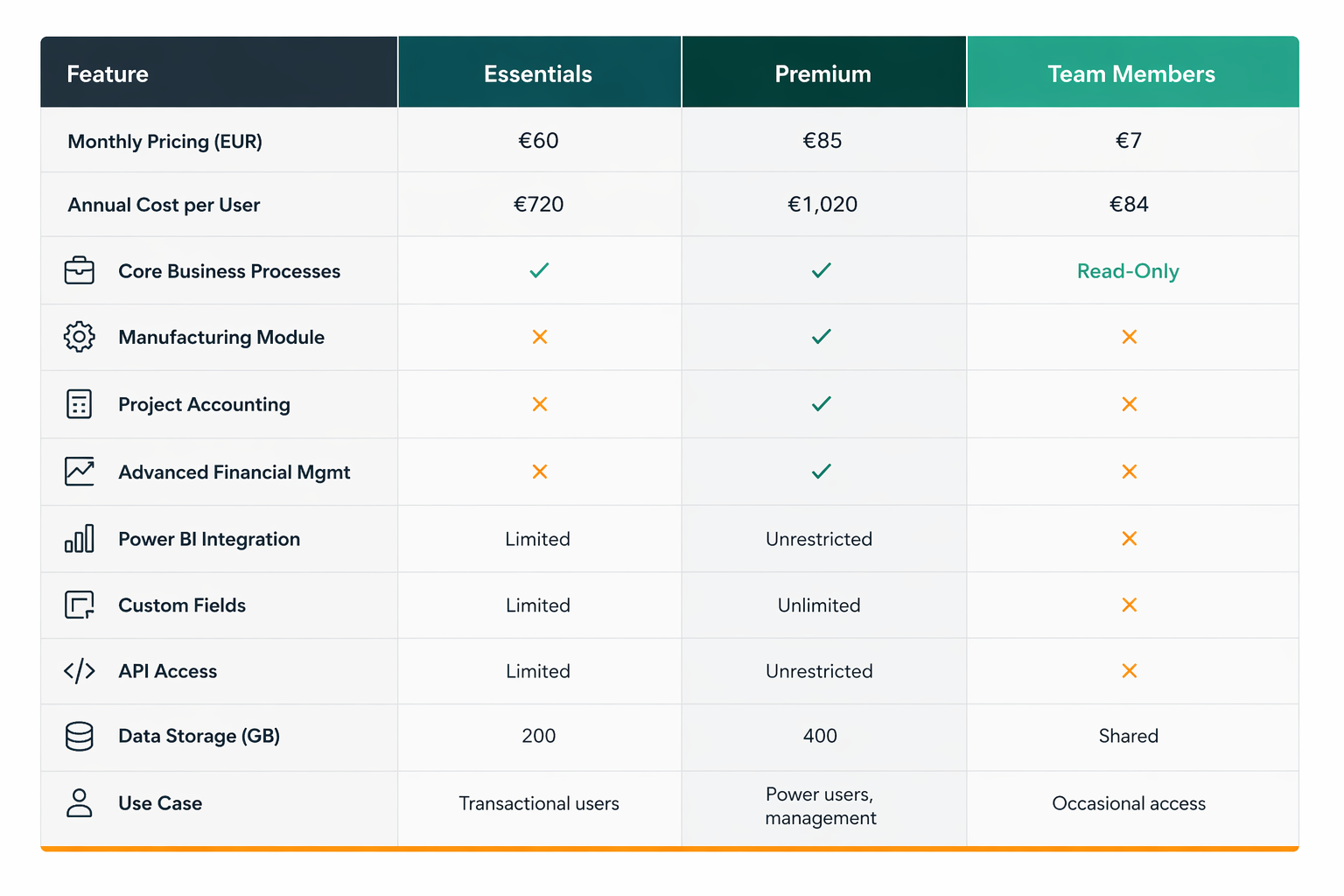
Microsoft Dynamics 365 Business Central offers three primary licence tiers, each designed for specific user roles and business requirements. Selecting the right mix directly impacts both functionality and total expenditure.
Essentials Licence
The Essentials licence is positioned as Business Central's entry-level option, ideal for companies new to cloud-based ERP or those with a high proportion of data-entry and transactional users.
Pricing: Approximately €60 per user per month (billed annually)
What's Included:
- Core business process automation (sales, purchasing, inventory, general ledger)
- Financial reporting and management
- Basic sales order processing
- Inventory management
- Multi-currency and multi-company support
- Integration with Microsoft 365 (Teams, Outlook, Excel)
- API access for custom integrations
- Capacity: 200 GB of data storage per tenant
Limitations:
- No manufacturing functionality (Bill of Materials, routing, capacity planning)
- Limited advanced analytics (Power BI integration restricted)
- No project accounting module
- Restricted API call allowances
- Limited custom field creation
For small to medium businesses or departments handling core transactional work, Essentials represents solid value. However, mid-market organisations with complex supply chains or manufacturing operations frequently discover that Essentials constraints necessitate a migration to Premium within 12-18 months.
Premium Licence
Premium is Business Central's flagship offering, designed for power users and organisations requiring comprehensive ERP functionality.
Pricing: Approximately €85 per user per month (billed annually)
What's Included:
- All Essentials features
- Manufacturing module (Bill of Materials, routing, capacity scheduling)
- Project accounting and project-based billing
- Advanced financial management (consolidated accounting, intracompany transactions)
- Unrestricted Power BI and analytics capabilities
- Advanced reporting and Business Intelligence features
- Unlimited custom fields
- Enhanced API allowances
- Capacity: 400 GB of data storage per tenant
Premium is the licence of choice for:
- Organisations with manufacturing or assembly operations
- Companies requiring detailed project tracking and profitability
- Businesses needing advanced financial consolidation
- Organisations leveraging Power BI for strategic analytics
Team Members Licence
Team Members are a cost-effective option for occasional users who need read-only access or simple data entry without requiring full Business Central functionality.
Pricing: Approximately €7 per user per month (billed annually)
What's Included:
- Read-only access to data
- Ability to create and edit documents (quotes, orders, invoices)
- No access to setup or configuration
- No API access
- Ideal for: Department heads, CFOs reviewing dashboards, sales representatives accessing customer information
Business Central Essentials vs Premium: Side-by-Side Comparison
The Hidden Costs: Beyond Licence Fees
This is where reality diverges sharply from licensing spreadsheets. The monthly licence cost represents only 20-30% of the total expenditure for a successful Business Central deployment in a mid-market environment.
Implementation and Deployment Costs
Professional implementation typically costs €80,000-€250,000 for a 50-user organisation, depending on complexity. This includes:
- Business analysis and requirements gathering (€15,000-€40,000)
- System configuration and customisation (€30,000-€120,000)
- Data migration from legacy systems (€15,000-€50,000)
- User training (€10,000-€25,000)
- Testing and quality assurance (€10,000-€15,000)
Key Insight: Implementation costs are fixed regardless of whether you deploy in month 1 or month 6. Delayed projects multiply these expenses through extended consulting engagement and resource allocation.
Customisation and Development
Out-of-the-box Business Central addresses 70-75% of typical mid-market requirements. The remaining 25-30% usually demands custom development:
- Custom reports and analytics (€10,000-€30,000)
- Integration with third-party systems (ERP, CRM, logistics platforms: €15,000-€50,000)
- Workflow automation and business process extensions (€5,000-€20,000)
- Mobile app customisations (€5,000-€15,000)
Data Migration
Moving data from legacy systems (SAP, Navision, ERP LTS, or spreadsheet-based processes) is deceptively complex:
- Data cleansing and mapping (€10,000-€30,000)
- Testing and validation cycles (€5,000-€15,000)
- Historical data archival and handling (€3,000-€10,000)
Poor data migration creates months of post-implementation firefighting and user dissatisfaction.
Training and Change Management
Organisations often underestimate training costs. Effective training requires:
- Train-the-trainer programmes (€5,000-€10,000)
- Role-specific training materials (€3,000-€8,000)
- Ongoing support during the first 6 months (€10,000-€20,000)
- Change management and adoption consulting (€5,000-€15,000)
Without proper training, users default to workarounds, defeating the system's purpose.
Ongoing Support and Maintenance
Post-launch support averages €200-€400 per month for a 50-user organisation, including:
- Helpdesk and incident management
- Minor customisation requests
- Monthly updates and patch management
- Preventive system health checks
Real-World 3-Year Total Cost of Ownership Example
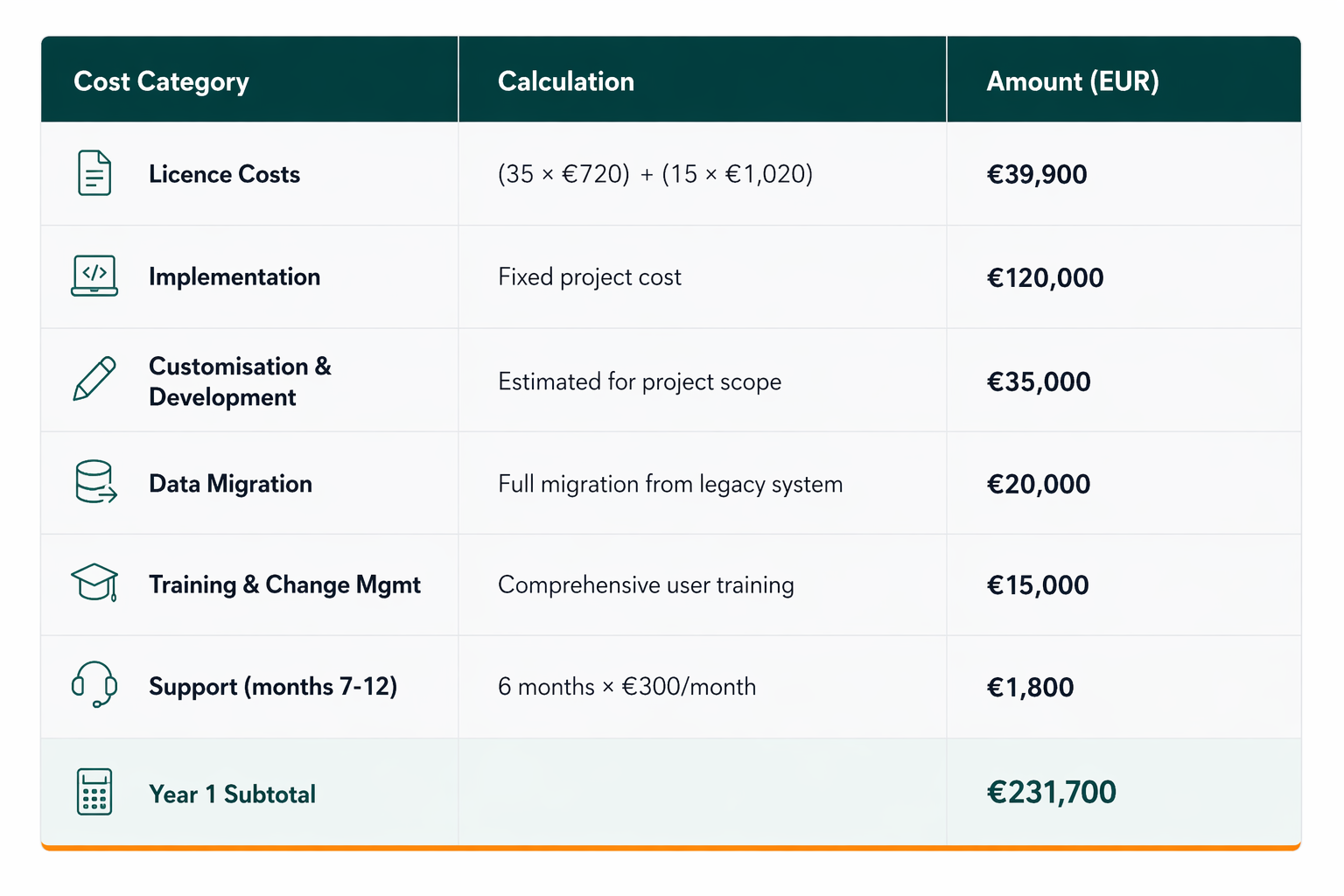
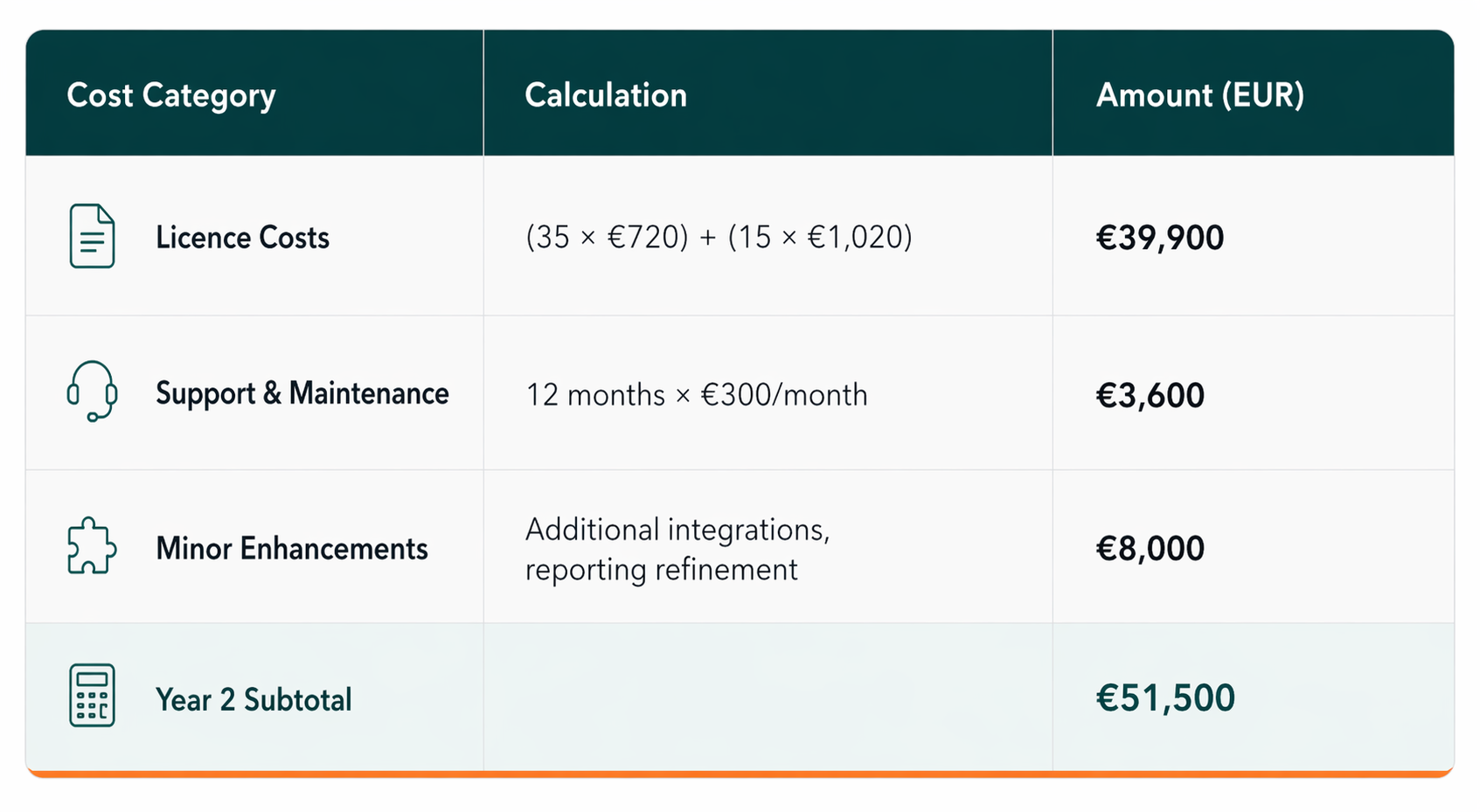
Let's model a realistic 50-user mid-market organisation deploying Business Central with a 70/30 Essentials-to-Premium licence split (35 Essentials users, 15 Premium users).
Year 1
Year 2
Year 3
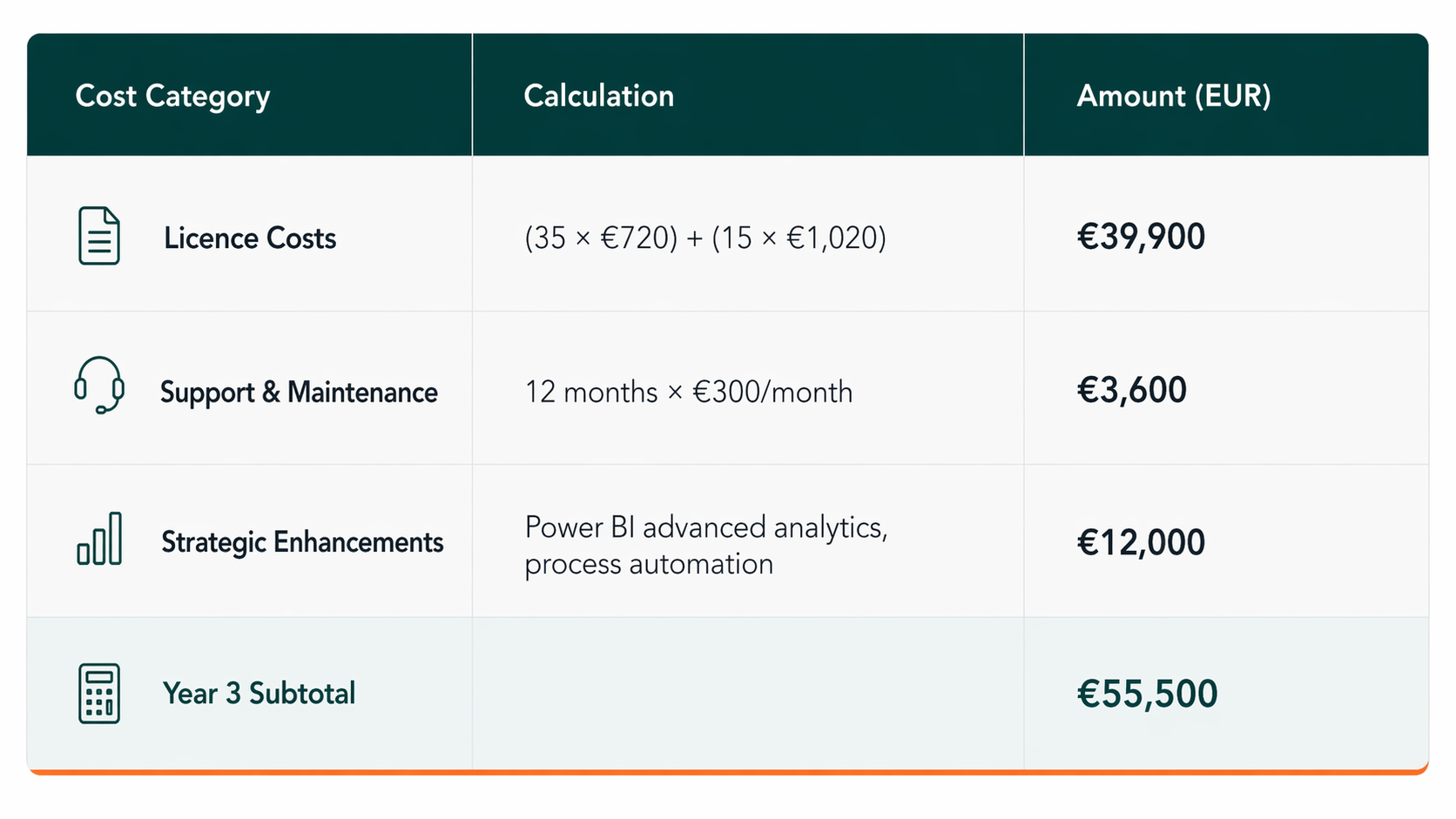
**3-Year Total Cost of Ownership: €338,700**
Per-User TCO (3 years): €6,774 per user
This breaks down as:
- Licence fees: 35% of total
- Implementation and deployment: 35% of total
- Ongoing support and enhancements: 30% of total
Mareks Polis, ERP Practice Lead at DIGMATIX, on Business Central Costs
"Most organisations underestimate Business Central's true cost by 40-50%. They focus on licence fees and miss the implementation, training, and customisation reality. In our experience across the Baltics and Nordics, the most cost-effective deployments are those that invest upfront in proper change management and training. Companies cutting corners on implementation often spend 2-3x more in Year 2 fixing problems that could have been prevented."
"Hidden costs also emerge from poor licence planning. Clients frequently purchase all Premium licences initially, then discover that 60% of their users only need Essentials. Alternatively, they start with Essentials and migrate to Premium within 18 months due to manufacturing or project accounting needs-essentially paying for two implementations. Smart licence strategy from the outset reduces long-term expenditure."
The Power of Microsoft Fabric and Power BI Integration
Business Central's integration with Microsoft Fabric and Power BI transforms raw financial and operational data into actionable intelligence-but realising this value requires deliberate planning.
Power BI Premium (Fabric) Cost: €600-€2,000 per month for capacity suitable for a 50-user organisation
Value Delivered:
- Real-time dashboards monitoring KPIs (cash position, inventory turnover, customer profitability)
- Predictive analytics identifying risk (late-paying customers, inventory obsolescence, margin erosion)
- Automated alerts enabling proactive management
- Reduced reporting time from hours to minutes
For CFOs and decision-makers, Power BI transforms Business Central from a transaction processor into a strategic analytics platform. The incremental cost pays for itself through faster decision-making and improved operational oversight.
Business Central Pricing Across European Markets
Currency fluctuation and regional support models create pricing variance:
- Baltics and Nordics: Pricing as quoted above; robust local partner ecosystem
- Poland: Slightly higher support costs due to VAT structure; strong Microsoft presence
- Croatia: Pricing aligned with Nordics; growing ERP consulting market
Multi-country organisations benefit from Business Central's native multi-currency and multi-company functionality, eliminating expensive data consolidation workarounds.
Return on Investment and Payback Period
For a typical 50-user mid-market company, Business Central ROI emerges through:
- Reduced Manual Processes: Elimination of spreadsheet reconciliation saves 1,000-2,000 hours annually (€30,000-€60,000 at typical salary costs)
- Faster Financial Close: Reduction from 8-10 days to 2-3 days, accelerating cash flow decisions
- Inventory Optimization: Better visibility reduces holding costs by 10-15% (potentially €50,000-€100,000 annually for a €500k inventory base)
- Improved Collections: Faster invoice-to-cash cycles reduce DSO by 5-10 days (significant working capital benefit)
- Compliance and Risk: Automated audit trails and controls reduce compliance risk and audit costs
Realistic Payback Period: 18-24 months for organisations with a clear business case and disciplined implementation
Frequently Asked Questions
Q1: Is Business Central more expensive than alternatives like NetSuite or SAP S/4HANA?
Business Central offers significantly lower total cost of ownership than NetSuite (which averages €150-180 per user monthly) or S/4HANA (which typically exceeds €250 per user monthly and requires substantial infrastructure investment). For mid-market companies, Business Central's price-to-functionality ratio is highly competitive. However, very large organisations (1,000+ users) or those with highly specialised industry requirements may find S/4HANA's advanced capabilities justify the premium.
Reference: Microsoft Dynamics 365 Business Central Pricing
Q2: Can we start with Essentials and upgrade to Premium later?
Yes, but plan carefully. Migrating from Essentials to Premium is administratively straightforward but may require process re-engineering if you've implemented workarounds to avoid Essentials' manufacturing or advanced analytics limitations. A small number of users can upgrade mid-year (prorated costs), but large-scale conversions should occur on annual licence renewal dates to minimise proration complexity.
Q3: What is the realistic cost of implementation per user?
For a 50-user deployment, expect €2,400-€5,000 per user in implementation costs (including training, customisation, and data migration). This ratio improves with scale: a 200-user deployment may cost €1,500-€3,000 per user. The single largest variable is customisation scope-organisations adhering closely to Business Central's standard processes achieve significantly lower per-user costs.
Q4: Is the Team Members licence worth purchasing?
Team Members licences (€7/month) represent exceptional value for read-only users: CFOs reviewing dashboards, department heads accessing reports, or sales staff checking customer account status. For organisations with 30+ such occasional users, Team Members licences can reduce total licence costs by 15-20% compared to purchasing full Essentials licences.
Q5: What are the typical ongoing support costs, and should we hire internal staff or use a partner?
Ongoing support costs typically range from €200-€500 per user annually, depending on complexity and customisation extent. Many mid-market organisations initially partner with an implementation partner for 6-12 months, then transition to a smaller managed services engagement (€300-€600/month for a 50-user environment). Building internal capability requires hiring an ERP administrator (€35,000-€50,000 annual salary in Baltics/Nordics) plus training time.
Optimising Your Business Central Investment
To achieve maximum ROI on your Business Central deployment:
- Invest in Planning: Spend 4-6 weeks on detailed requirements gathering. This investment prevents expensive mid-project scope expansion.
- Disciplined Customisation: Limit custom development to genuine business-critical gaps (typically 15-25% of functionality). Avoid the "nice-to-have" trap that inflates costs.
- Structured Training: Dedicate 5-8 hours per user to role-specific training. Poor training multiplies support costs and delays value realisation.
- Phase Implementation: For organisations with multiple locations or complex supply chains, consider phased rollout (accounting module first, then operations). This de-risks the project and spreads costs.
- Leverage Analytics Early: Implement Power BI dashboards in Month 3-4 of deployment, enabling users to see value tangibly and building adoption momentum.
Why European Mid-Market Companies Choose Business Central
Across the Baltics, Nordics, Poland, and Croatia, Business Central has become the mid-market ERP of choice because it balances cost, functionality, and implementation speed. The cloud-native architecture eliminates infrastructure costs, while the flexible licensing model scales with business growth.
For European organisations navigating multi-currency complexity, VAT compliance across jurisdictions, and GDPR data residency requirements, Business Central delivers native support without expensive customisation.